Agent: A Cloud Communication Family
Project
Omnichannel Product Design · B2B SaaS
As Lead Product Designer, I spent four years leading the research, conceptualization, design, and evolution of a new suite of B2B SaaS cloud tools for managing calls, messages, and digital conversations in contact centers.
We transformed a bloated, legacy desktop application into three distinct experiences tailored to different work contexts: Agent could be integrated directly within Smart Contact, our platform for monitoring and managing contact center operations; Agent Mini operated as a fully independent, omnichannel tool without requiring our platform or an external CRM; and Agent Lite streamlined phone operations into a compact bar linked to the agent's main web browser, allowing them to work alongside a CRM or any other web-based tool.
This approach allowed organizations to use Agent integrated into our Smart Contact monitor, connected to external tools, or as a standalone solution, all without compromising on the core features needed for their operations.
Workspaces
Visit website
01. Project in a Minute
/ A Quick Project Snapshot
Before diving into the full case study, here is a quick summary of the product, the challenge, my contribution, and the results.
What is it?
Agent is a family of cloud-based B2B SaaS tools that enables agents to manage calls, email, WhatsApp, Messenger, web chat, social media, and other digital channels. Agent integrated with Smart Contact, Agent Mini operated as a standalone omnichannel application, and Agent Lite streamlined phone operations into a browser-docked bar.
What problem did we solve?
The legacy tool forced clients with diverse channels, CRMs, and workflows to use the same desktop application. It was complex, required installation and training, and occupied a full second screen—even for agents who only needed to manage phone calls.
What was my role?
I led the end-to-end project for four years as head of the Product Design / UX/UI team, overseeing everything from Discovery and team recruitment to design, validation, handoff, and production QA.
What did I design?
A modular product family consisting of Agent, Agent Mini, and Agent Lite, with each version tailored to our clients' specific needs, alongside the architecture required to manage telephony, email, chat, and digital messaging: states, queues, channels, simultaneous conversations, components, and real-time synchronization.
What was the impact?
A product family deployed internationally for hundreds of clients and thousands of agents, reducing implementation times from several days to approximately 15–30 minutes, and boosting productivity by up to 40% in key analyzed workflows.

02. Context
/The operational layer of our monitoring platform
Smart Contact was our platform for monitoring, analytics, and contact center management. It allowed supervisors to understand real-time operations, view statistics, track calls and communications, analyze agent performance, and generate reports.
Agent was the operational tool used by agents to manage communications. Initially, it functioned independently of our Smart Contact monitor and was also used by clients working with third-party CRMs or without any additional CRM.
Agent is part of the Smart Contact ecosystem, our platform for monitoring and managing contact center activity.
View the full Smart Contact case study →
Even though both tools were part of the same workflow, their separation forced many agents to toggle between applications, often requiring a second screen dedicated solely to managing communications.

03. The Challenge
/ A single tool for completely different workflows
The previous tool had a large customer base and extensive features, but suffered from major usability, integration, and scalability issues:
Usability: A complex, outdated interface that required extensive training.
Technical dependency: Local installation, updates, and maintenance required on each computer.
Bloated product: A one-size-fits-all solution for clients with vastly different channels and operations.
Screen-space inefficiency: Agents frequently needed dual monitors, even when only handling calls.
Limited scalability: Slow deployments, high maintenance overhead, and difficulty tailoring the product for new clients.
The previous tool was designed as a single solution for all clients, despite their completely different workflows, channels, and tech stacks.
The challenge went far beyond a UI redesign: we had to rethink the product model, adapt it to diverse workflows, and make it scalable from the cloud.

04. My role and responsibilities
/Four years of end-to-end leadership
I led the strategy and design of the Agent product suite from concept to its production-ready evolution. I drove the design decisions independently, aligning and validating the strategic direction directly with the Product Director.
I also led the Product Design and UX/UI team, drove hiring for new roles, and coordinated cross-functional collaboration with Product Managers, Sales, Support, Operations, Systems, and engineering teams specialized in voice, email, messaging, and data.
My core responsibilities included:
Leading Discovery, benchmarking, and field research.
Conceptualizing product strategy and defining the three Agent solutions.
Information architecture, user flows, wireframing, UI, and prototyping.
Design System ownership, specialized component design, iconography, and branding.
Leading, hiring, and mentoring the UX/UI team.
Validation, functional documentation, developer handoff, and QA through to production.
Every interaction design decision had to seamlessly integrate into an architecture capable of handling thousands of communications, while keeping the Agent suite, distribution systems (tables, KPIs...), and Smart Contact monitoring tools fully synchronized.

05. How we identified the opportunity
/Research before design
The project kicked off several months before any design work began. I met with the Sales team to gather client needs, analyzed leading market solutions, and studied how other contact centers handled telephony and omnichannel communication.
We then took our research into the field:
We visited three different call centers.
I observed agents' workflows first-hand.
I conducted formal interviews and contextual inquiries.
I compared operations integrated into our Smart Contact monitor against those using standalone external CRMs or Agent.
I analyzed different industries, clients, and customer service models.
I leveraged our internal call center to quickly validate our findings.
Our research revealed that a significant portion of clients worked exclusively with voice calls, yet were still using an omnichannel tool that took up their entire screen.

06. Insight and Design Principles
/Design for the Context, Not the Average User
The key insight was:
Customers didn't need a heavier tool with every single capability; they needed access to only the right features within their actual work context.
Based on our research, we defined four principles:
Modularity: Adapt the product to different channels, tools, operations, and work environments, rather than forcing every customer to use the same solution.
Continuity with Primary Tools: Enable agents to manage communications without leaving their CRM, browser, or usual workflow.
Space Optimization: Avoid requiring dual screens unless necessary, making better use of the available screen real estate for each task.
Simplicity and Usability: Minimize steps, display only the necessary functions, and expand the interface only when the task requires more information or context.
These principles shifted the redesign from a UI challenge to a strategic product decision: replacing a monolithic application with a family of adaptable solutions.

07. From findings to architecture and user flows
/Designing the logic first, the interfaces second
Before defining the UI, I translated our research findings into an architecture capable of supporting different channels, tools, and operational workflows. The first step was to identify which capabilities should be shared, which were channel-dependent, and what format each work context required.
I worked with:
Functional maps to organize channels, groups, statuses, queues, and permissions.
User flows for inbound and outbound calls, transfers, holds, wrap-ups, and call disposition.
State diagrams to map manual and automatic transitions, errors, and concurrent communications.
Low and high-fidelity wireframes to validate hierarchy, information density, and behavior before designing the final interface.
Interactive prototypes to test and validate flows with the in-house call center.
This approach made it possible to spot contradictions before development began, align on a shared logic with Product and Engineering, and define how a single feature should adapt to Agent, Agent Mini, and Agent Lite.

08. The solution
/One platform, three ways to work
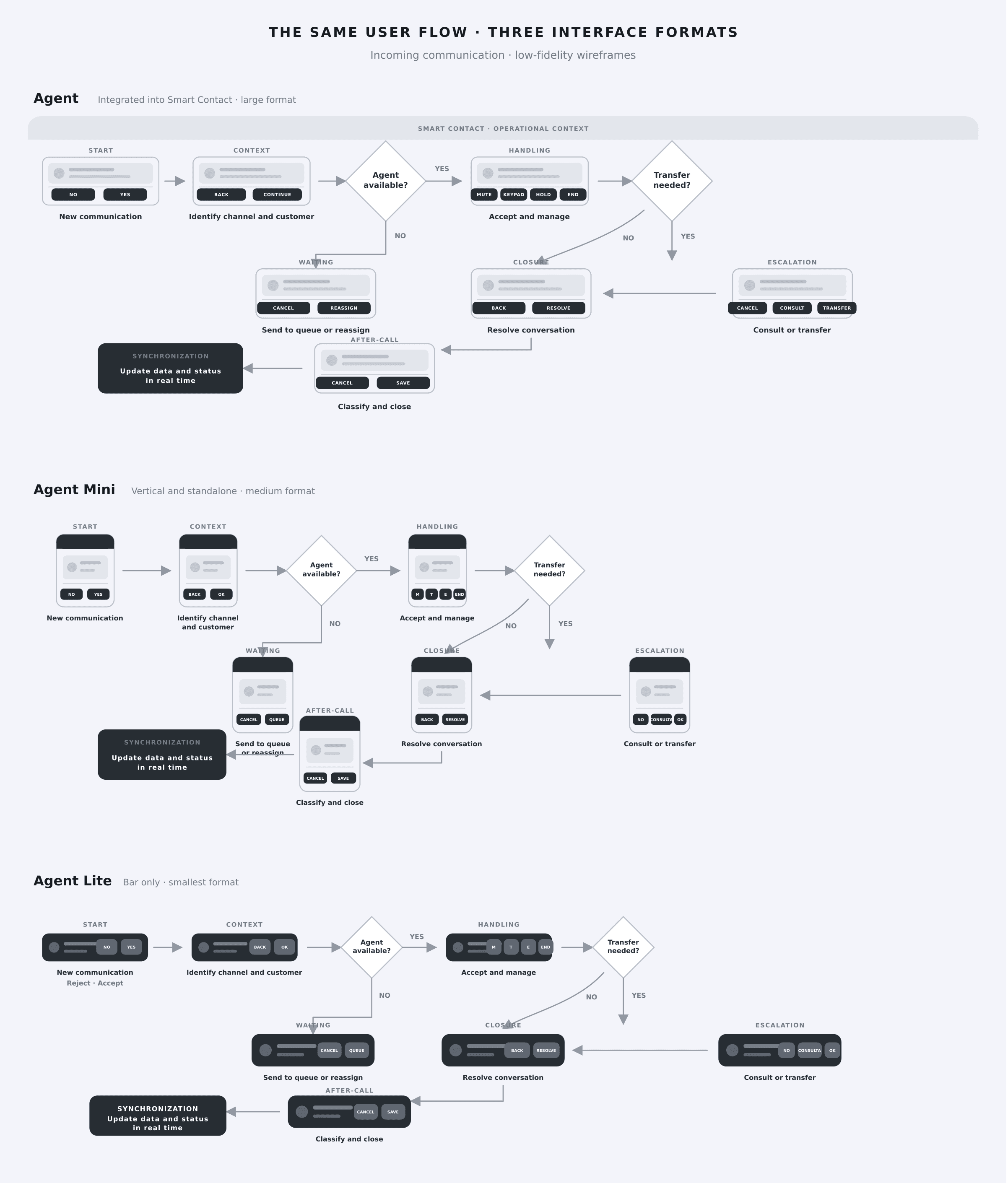
We transformed the monolithic application into a modular family of three solutions. Agent and Agent Mini shared all omnichannel functionality, while Agent Lite focused on advanced telephony capabilities for operations that didn't require digital channels.
Agent: omnichannel capabilities integrated into Smart Contact.
Agent Mini: full omnichannel capabilities in a standalone application.
Agent Lite: telephony operations linked to the main browser.
All three versions could coexist within the same organization, allowing each team to use the format best suited to their operations.
09. Agent
/Integrated communication within the contact center monitor
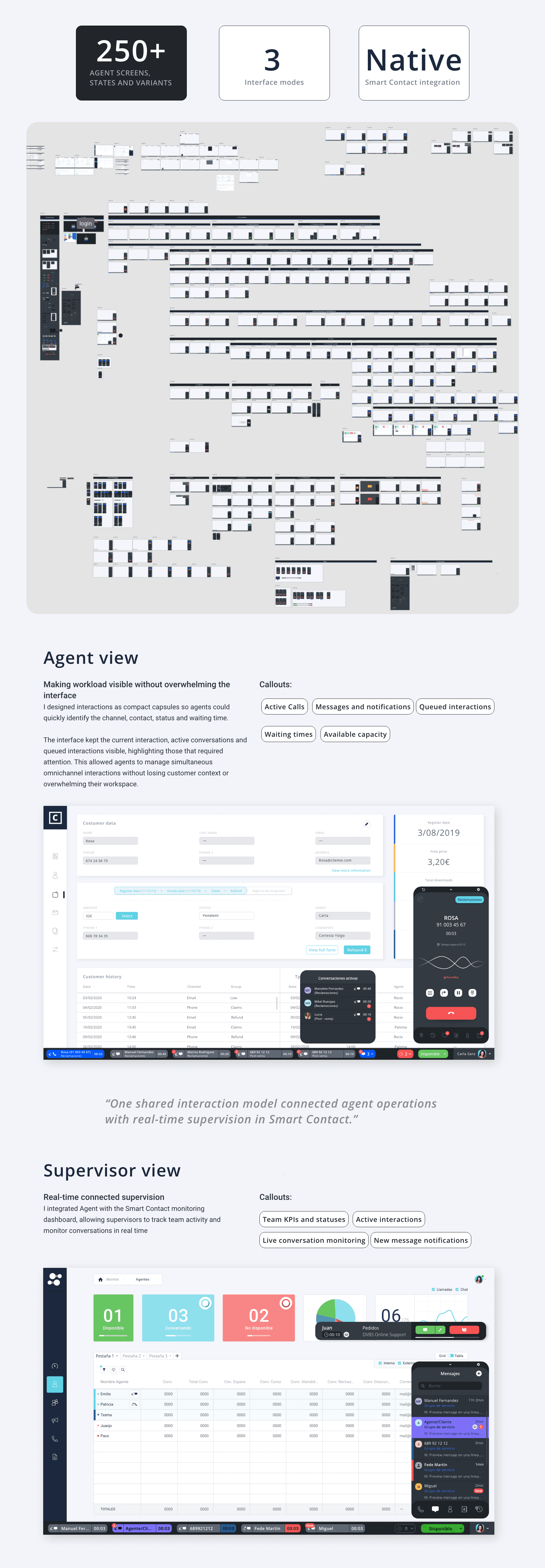
I designed Agent for clients using Smart Contact, our platform for monitoring and managing everything happening in the contact center. Rather than forcing agents to open a separate tool, I integrated access to all communications into a bar located at the bottom of the platform.
I included full omnichannel capabilities: telephony, email, WhatsApp, Messenger, web chat, social media, and other digital messaging channels. To cover this complexity, I designed more than 250 screens, states, and interaction variants, accounting for availability, queues, simultaneous conversations, incoming and outgoing calls, transfers, holds, recordings, transcriptions, post-call work, wrap-up codes, errors, and edge cases.
I designed the bar to remain compact during routine operations and expand when interactions required more space. This allowed agents to view customer data and manage communications without leaving their workspace.
I also designed the integration between operational activity and supervision, ensuring that states, groups, calls, conversations, and times updated in Smart Contact's KPIs and tables in real time.
What I solved
Eliminated the gap between the monitor and the communication tool.
Integrated all operations into a single environment.
Kept customer data and context visible.
Synchronized agent activity with supervision in real time.
Reduced switching between applications and screens.
10. Agent Mini
/Complete omnichannel capabilities in a standalone tool
I designed Agent Mini to bring the same omnichannel capabilities of Agent to a complete, standalone cloud application. It didn't require Smart Contact, a CRM, or any other platform to function: from here, agents could make calls and manage email, WhatsApp, Messenger, web chat, social media, and other digital conversations.
The challenge was not to cut features, but to reorganize them into a much more compact format. Agent Mini retained states, groups, queues, directory, contacts, history, call waiting, transfers, recordings, transcriptions, disposition codes, and simultaneous conversations within a vertical interface roughly the size of a phone.
Its format allowed it to be used as a sole communication tool or kept open alongside a browser, CRM, or any other application when agents needed to reference additional information. This freed up screen real estate without restricting the client's workspace.
I designed over 200 screens, states, and variants to adapt the entire omnichannel workflow to this format, including specific experiences for both agents and supervisors.
It allowed Agent Mini to be used without Smart Contact and without depending on an external CRM.
What I Solved
Maintained full omnichannel functionality in a compact format.
Freed up screen space to work with other tools on a single monitor.
Provided a complete solution for clients who only needed the communication layer.
Simplified product adoption across different environments and workflows.

11. Agent Lite
/All phone operations docked to the main browser
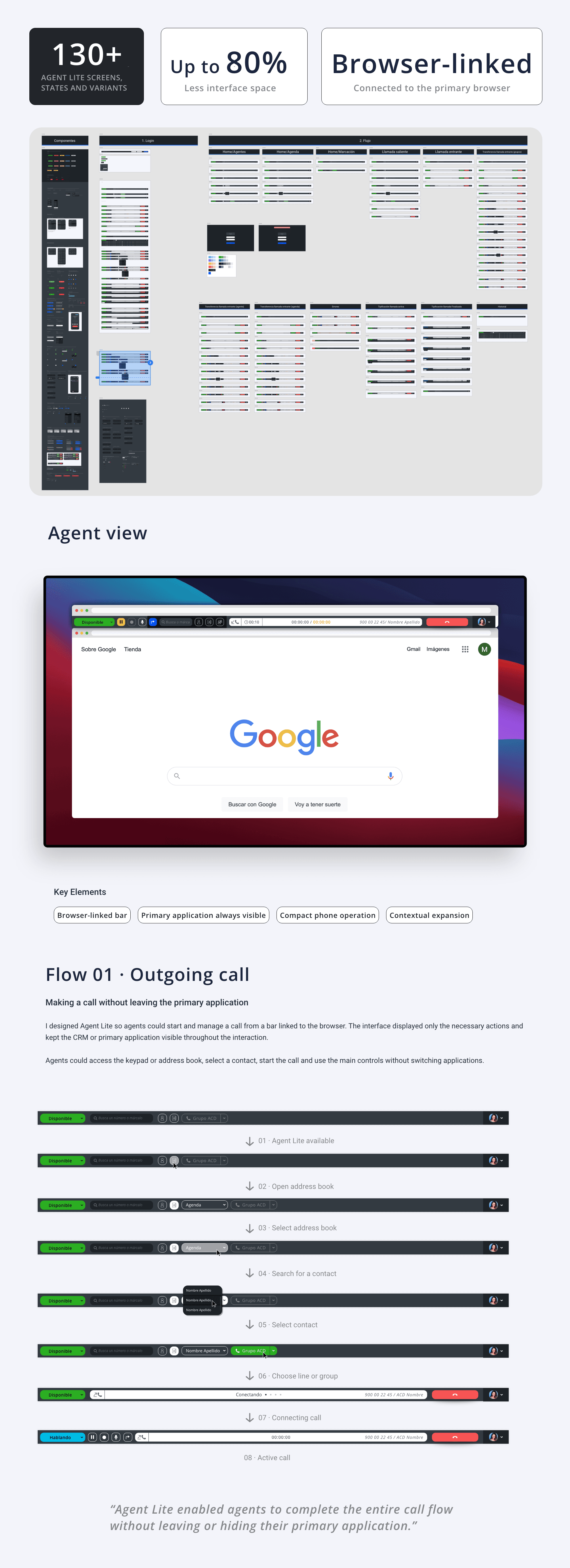
I designed Agent Lite as a sidebar docked to the agent's main web browser. This browser typically displayed their CRM, an internal tool, or any other web application used during customer support. If the user moved or resized the browser, Agent Lite moved and scaled with it.
Most phone operations could be handled directly from the sidebar without leaving or hiding the content on the main browser.
When a task required more context—such as checking the user history—I designed the interface to automatically expand and adjust the available space in the main browser. Once the task was complete, it returned to its compact size.
I designed over 130 screens, states, and variants to handle phone operations within this format, including inbound and outbound calls, holds, transfers, contact list, history, errors, wrap-up, and call disposition.
This behavior freed up an entire screen without reducing call capabilities.
Show only what is necessary during routine operations, and expand the workspace when the task requires more context.
What I solved
Freed up an entire screen by consolidating phone operations into a browser-docked sidebar.
Kept the CRM or primary tool visible throughout the entire interaction.
Automatically adapted Agent Lite to browser movement and resizing.
Displayed only the necessary actions during routine operations.
Expanded the interface when tasks required more context and returned to its compact size afterward.
Kept calls, holds, transfers, contact list, history, and call disposition within a minimal footprint.
12. From local installation to the cloud
/Scaling without seat-by-seat installation
The previous tool had to be installed and updated individually on each computer. A deployment could require several days of configuration, technical support, and training.
We built Agent from scratch as a cloud solution accessible from any browser. Each agent logged in with their credentials and automatically received their corresponding channels, groups, roles, and permissions.
The new model enabled:
Instant, centralized updates.
Agile onboarding for new agents.
Reduced maintenance.
Elimination of obsolete versions.
International scaling.
Easier remote working.
We reduced deployments that used to take several days to a setup time of approximately 15–30 minutes.
The ability to work with a single screen in specific operations also reduced the need for extra hardware and maintenance.
The transition to the cloud was not just a technical decision: it transformed installation, maintenance, and the ability to scale the Agent family internationally.

13. Translating agent activity into reliable states
/Reconciling channels with different paces
One of the greatest challenges was designing a state model that reconciled the immediacy of telephony with the asynchronous nature of messaging.
A phone call demanded immediate attention and required exclusive capacity. Conversely, an agent could handle multiple digital conversations at once, belong to different queues, and remain available for specific channels.
Consequently, simply displaying "available" or "busy" failed to accurately reflect what was actually happening.
We designed a system that mapped:
The agent's operational state.
Available channels.
Active communications.
Available capacity per channel.
Assigned queues.
Pending conversations.
Agents could be available, unavailable, on break, in a call, in wrap-up time, invisible, or offline. Some state changes were manual, while others triggered automatically when receiving or ending a interaction, or upon losing connection.
This logic kept actual agent activity fully synced with the KPIs, tables, queues, and routing systems used by supervisors in Smart Contact.
The challenge lay not in displaying a status, but in accurately representing what the agent was doing and how much capacity they had left on each channel.

16. Continuous validation
/An in-house call center in action
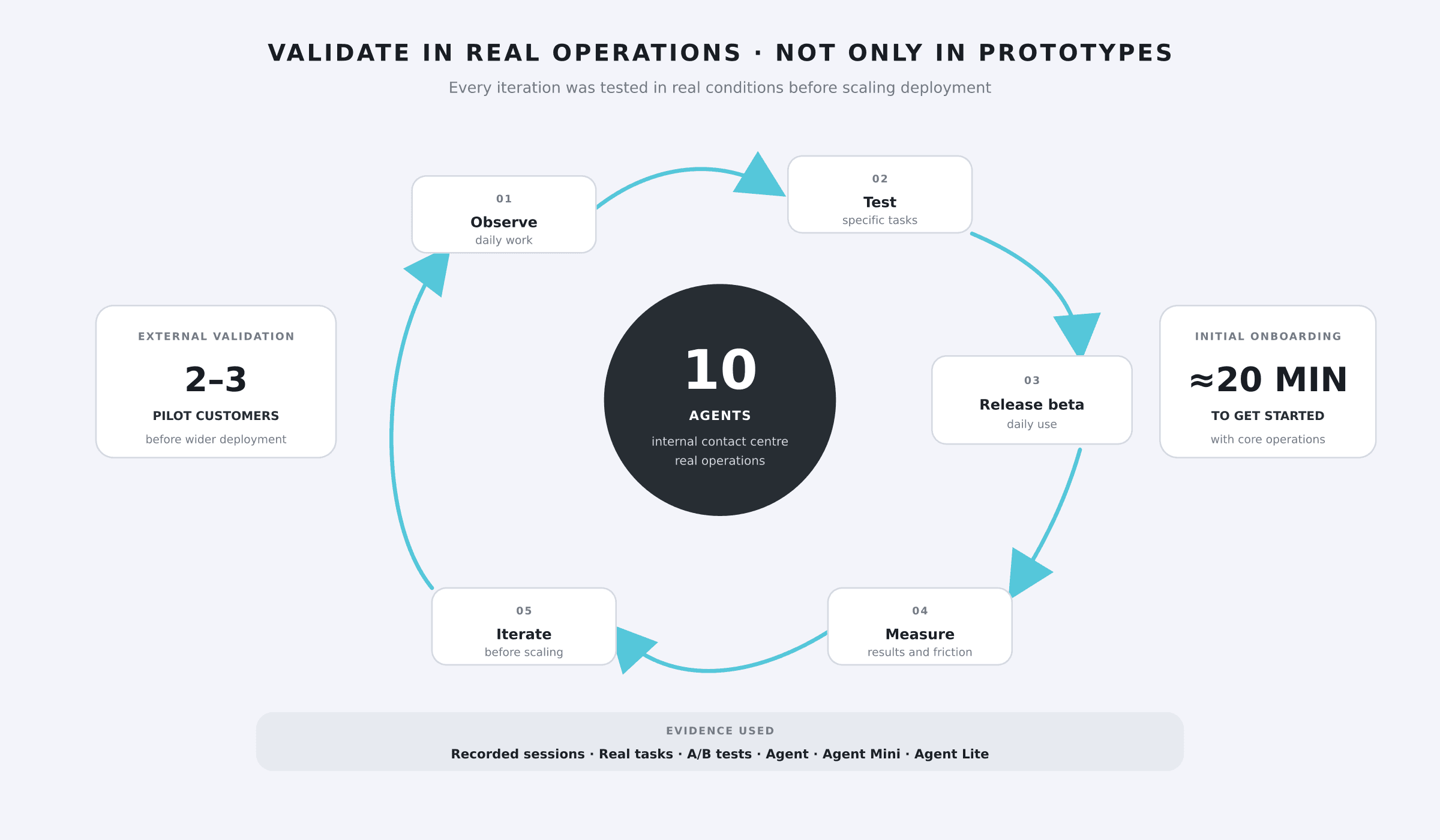
Having an in-house call center with ten agents allowed us to test the product within a real operation before rolling it out to external clients.
We worked with:
User interviews.
Session observation and recording.
Usability testing with specific tasks.
A/B testing and comparisons between alternatives.
Beta versions integrated into daily workflows.
Analysis of different user habits and mental models.
Two or three external pilot clients before scaling the rollout.
The agents used Agent, Agent Mini, and Agent Lite, which allowed us to validate all three experiences under real-world conditions and iterate continuously.
The new interface also reduced onboarding time: a brief twenty-minute walkthrough was enough to start managing core operations.
17. Design System and evolution
/Maintaining three products without tripling the effort
Agent was built on the Smart Contact Design System, but incorporated specific communication patterns and a dark UI theme to quickly differentiate the agent's workspace from the supervisor's environment.
The Agent-specific library included:
Telephony and messaging patterns.
Capsules for calls, emails, chats, and active conversations.
Agent statuses and channel-specific capabilities.
Queues, notifications, holds, and errors.
Expandable components and responsive behaviors.
Shortcuts for the most frequent tasks.
Custom iconography for channels, statuses, and actions.
Variants tailored to Agent, Agent Mini, and Agent Lite.
The shared foundation allowed us to deploy every new feature across all three solutions without maintaining three separate design systems.
The Design System didn't eliminate complexity—it allowed us to manage and scale it.

18. Handoff and Production Delivery
/Designing the Interaction and Ensuring Implementation
I documented the functional logic, states, variants, constraints, and edge cases required for multiple technical teams to implement a consistent experience.
I worked directly with development teams specializing in voice, data, email, messaging, and core systems during refinement, handoff, and development. I then conducted UX/UI QA to verify that flows, behaviors, and states functioned correctly in production, resolving issues and questions directly with the engineering teams.
This coordination was critical because a single interaction often relied on multiple systems and had to be reflected simultaneously in Agent as well as in agent information, tables, and Smart Contact KPIs.

19. Impact
/From an on-premise installation to a scalable, global cloud platform
The Agent suite was deployed internationally, supporting hundreds of clients and thousands of agents. The three solutions could coexist seamlessly within the same organization, adapting to diverse teams and workflows.
Key results
Implementation times cut from several days to approximately 15–30 minutes.
Instant updates delivered to all clients simultaneously.
Onboarding reduced to about 20 minutes.
Ability to work with a single screen in specific workflows.
Reduced dependency on monitors, manual installations, and maintenance.
Up to 40% productivity gains across analyzed workflows.
Global adoption by hundreds of clients and thousands of agents.
Highly positive feedback in annual quality surveys.
The solution simplified workstation setup, updates, and maintenance, while making the product adaptable to a wider range of business needs.
The project was also awarded internal recognition for its business impact and scalability.

20. Key Takeaways
/Designing living systems, not static interfaces
The Agent family proved that omnichannel complexity isn't solved by displaying every option at once. It is solved by understanding context, mapping states accurately, and building an architecture capable of adapting the experience without fragmenting it.
Over four years, I consolidated a workflow where Design is involved across the entire lifecycle: research, strategy, architecture, interaction, validation, technical coordination, production, and evolution.
I also learned that a mature Design System delivers far more than visual consistency. It enables the management of multiple experiences, aligns specialized teams, and turns every new feature into a scalable improvement across the entire product.
Designing the Agent family meant balancing the immediacy of telephony and the flexibility of messaging within a modular architecture. This system adapts to each client's workflows and needs, turning that flexibility into a better user experience and a competitive edge in a diverse market.

21. Summary and Navigation
/Connecting with Smart Contact
Agent handles the real-time interaction layer that every contact center agent relies on. The Smart Contact case study shows the other half of the ecosystem: how I built and scaled the monitor, its dashboards, its architecture, and the Design System that both products share.
